 Documentation
Agent
PacketSafari Agent is the autonomous analysis workflow. It starts from a capture-aware question, plans focused tasks, tests packet evidence, and can produce persisted report milestones beyond the deterministic Upload Insights surface.
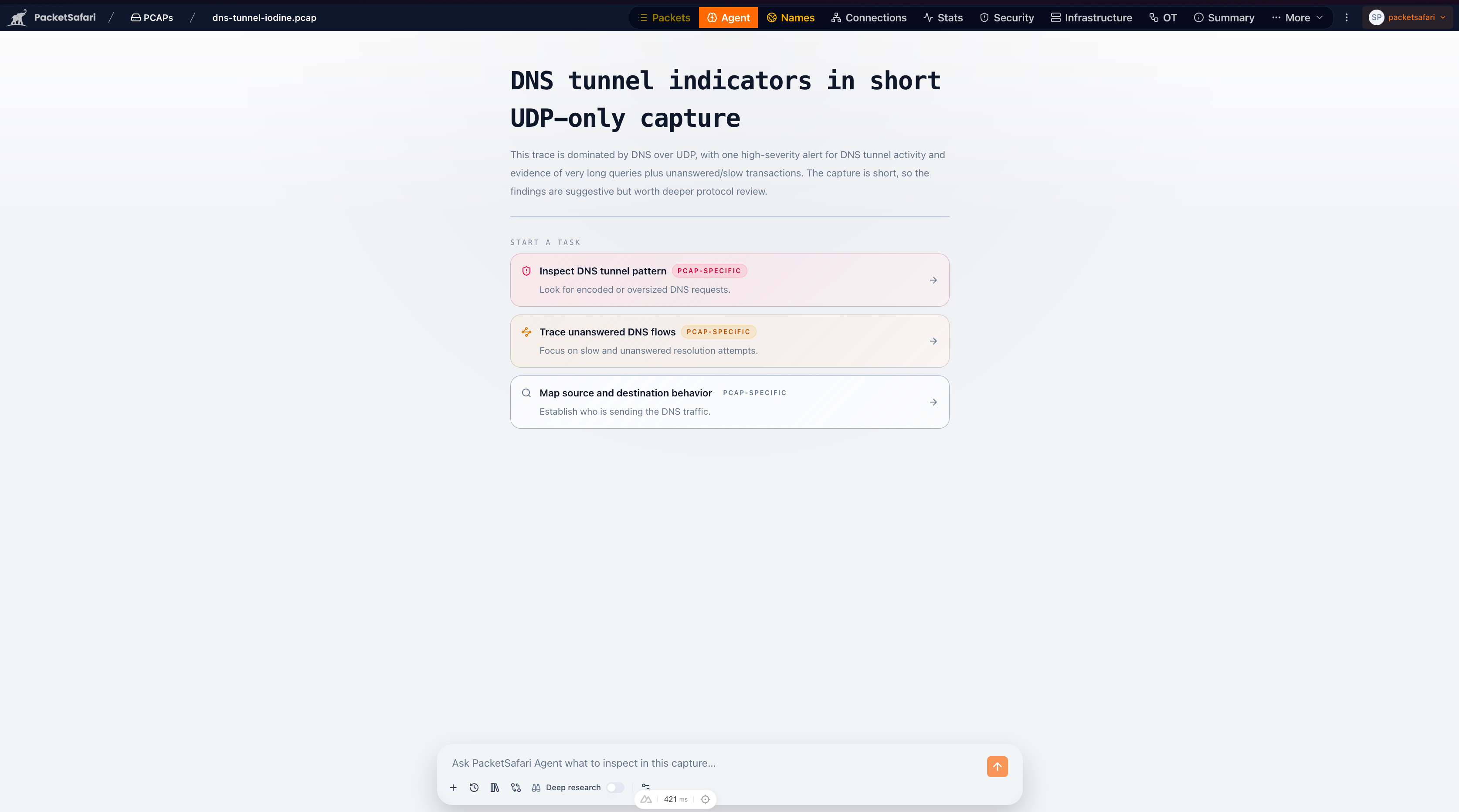
Use Agent when:
- you want to upload a PCAP and ask for an answer in one flow
- Upload Insights or manual packet review suggests an issue worth deeper review
- you want PacketSafari to drive the next steps instead of asking a back-and-forth chat
- you need a model-driven investigation beyond Upload Insights and manual packet pivots
Upload and ask AI
The fastest route into Agent is Investigate with Agent in the upload dialog. Choose an Is the network at fault? shortcut, Executive summary, Root cause, Security review, or Custom prompt, then choose how PacketSafari should balance first-result speed and capture-wide context:
Is the network at fault? requires a reported symptom and recommends Full investigation. It is a focused ownership assessment rather than a smaller Root cause report. The result uses one explicit verdict: network primary cause, network contributing factor, no captured network fault, or inconclusive. Packet evidence, capture limitations, and recommended next evidence remain required.
Verify an existing alert is available when uploading a capture or starting an investigation from an existing capture. Paste alert text (up to 8 KiB) or one Suricata EVE JSON event (up to 64 KiB), then choose Fast answer, Full investigation, or Triage then report. The alert is assessed against the selected capture's packet evidence; a matching signature is not by itself proof of malicious execution. Full IDS is optional and separate from this goal, so inspect its status rather than assuming an alert assessment reran or completed every IDS rule.
- Full investigation starts a focused preliminary Agent while PacketSafari Triage builds indexed evidence. It requires a concrete operator problem/question. After the Fast Report, Triage completes and the Final Report checks the Fast Report against completed Core coverage and newly retrieved packet evidence. This is the recommended early-start path when eligible.
- Fast answer starts one bounded preliminary Agent as soon as the capture is safely readable. It requires a concrete operator question or focused starting point; a generic preset-only “analyze this capture” request is insufficient. A specific symptom can qualify without an exact selector, but a large root-cause capture may still require structured focus. It may miss correlations elsewhere in the capture.
- Triage then report waits for capture-wide Core processing, then retrieves the bounded packet evidence needed for one Final Report. It is the slowest path to the first report, the strongest capture-wide starting point, and the only preset-only broad path.
From a completed Fast Report you can continue in the same investigation: Run Triage and analyze (recommended) adds Triage and a Final Report, and Verify findings runs an independent check of the report against the packets.
Executive summary below 5 MiB and Security review up to 10 MiB recommend Triage then report. Security review always requests full IDS plus Triage. On a larger capture with a concrete question, Full investigation can be recommended while Triage/IDS continue into its Final Report. The 10 MiB boundary is the Sharkd progressive preliminary-first/indexing gate, not an IDS postprocessor cutoff.
See Investigation Path Guide for the full comparison. Manual inspection, guided Copilot, and Agent automation can all use the PacketSafari Core Engine; they describe who drives the investigation, not how much processing must finish before Agent starts.
When anoncap is enabled, Agent runs against the anonymized sibling capture. Where mail delivery and entitlement allow it, PacketSafari can email the selected Fast Report and Final Report milestones, and the result of a Verification follow-up, as distinct persisted artifacts.
Typical flow
- Start from Investigate with Agent during upload, or review Upload Insights or your current analyzer context.
- Open Agent from the analyzer header when you are already inside the capture.
- Choose the investigation tier that fits the task.
- Add Case context when the capture has known symptoms, measurement points, or operational notes.
- Start one of the capture-specific tasks.
- Review the resulting findings and pivots, then continue in packets, stats, security, or infrastructure as needed.
New investigation vs quick question
The Agent activity rail keeps two entry points separate:
- New investigation opens the managed investigation setup and can produce the selected Fast Report and Final Report milestones.
- Ask a quick question opens an interactive PCAP chat for a bounded question or follow-up. It stays separate from managed investigation milestones and does not silently become a root-cause report workflow. Every submitted standalone question uses one Quick question from the same allowance as Copilot.
A follow-up attached to an existing full investigation is different: it remains included in that investigation's Analysis run and does not consume a Quick question. Opening Agent, reading a result, or typing without submitting consumes nothing.
Running and completed chats remain visible alongside managed investigations so you can return to the right conversation without starting a duplicate run.
Advanced capture queries
Open More → Query from any capture workspace to use the bounded PacketQL workspace. After Triage prepares a queryable generation, Agent also exposes an advanced-query shortcut. Both entry points compare or rank one retained Core fact family without rescanning the PCAP or saving another set of query rows.
Use it for focused calculations such as ranking TCP streams by observed bytes, comparing retransmissions, or grouping reset-bearing streams by termination outcome. Results retain coverage warnings and packet anchors when the source facts provide them. See Advanced capture queries with PacketQL.
Investigation tiers
PacketSafari counts completed user-initiated full analyses rather than model tokens or customer cases. Every tier consumes exactly one run only when its workflow completes, so model choice and depth do not make the customer allowance unpredictable. Inconclusive completed analyses count; failed or interrupted workflows and automatic retries do not.
| Tier | Best for | Analysis-run use |
|---|---|---|
| Fast answer · Standard model | Focused autonomous preliminary investigation from a concrete operator question. | 1 analysis run. |
| Full investigation | A concrete question followed through a Fast Report, capture-wide Triage, and a Final Report that checks the Fast Report. | 1 analysis run. |
| Fast answer · Strongest model | Focused preliminary investigation on the strongest configured model profile. | 1 analysis run. |
| Triage then report · Strongest model | Capture-wide discovery followed by one Final Report on the strongest configured model profile. | 1 analysis run. |
The monthly Analysis-run allowance comes from the active plan or contract. Any supported mix of focused, verified, deep, standard-model, and strongest-model investigations uses the same one-completed-analysis/one-run rule.
The Full investigation upload workflow uses a fixed validated runtime profile, counts one analysis run when it completes, and includes both the Fast Report and the later Final Report work. Verification follow-ups and Final Reports state their exact typed outcomes; neither is called verified unless its evidence contract succeeds.
Enterprise and on-prem allowances use the same one-investigation/one-run rule. The active organization contract or on-prem license supplies the Analysis-run limit. Normal SaaS users see the lane names above rather than provider model IDs.
Case context
Case context is optional text you can add before starting an Agent run. Use it for details that are not obvious from packets alone, such as where the trace was captured, what the user reported, which systems are expected to be involved, or what changed before the issue started.
Good context is short and operational:
Captured on the client side during a reported website timeout. The user can
reach other sites. Focus on whether the failure is local, policy-related, or a
server-side delay.
Agent uses this context to focus the investigation, but packet evidence remains the source of truth for findings.
Reports and exports
Agent persists each selected report milestone as the investigation completes. The saved report keeps the narrative answer, findings, evidence references, model/session details, and capture context together so the work can be reopened from the Agent stream or the shared AI Analyses history page.
From a saved report, choose Export for report PDF, PDF with retained conversation or full public transcript, Watermarked HTML, or Watermarked JSON.
Report milestones save readable Markdown and validated structured decisions
through the Agent's submit_investigation_report tool. This applies to report
stages launched from uploads, investigation dialogs, the Agent tab, and the CLI.
The conversation displays the narrative rather than the JSON envelope. Ordinary
chat and follow-up replies remain conversational; they do not have to submit a
structured report. Triage-only runs do not request an AI report.
To inspect structured decisions, open the analysis from AI Analyses or this capture's Agent history, select its saved report, and choose Export → Watermarked JSON. Decision fields are included when available. Structured results, beside Report info, opens a readable summary and a JSON tab with Copy JSON. The dialog contains saved decision fields; Export contains the complete report. Report info continues to show report metadata. The downloaded report has a different outer envelope from the CLI/API investigation result, although both use the saved report.
Structured validation does not certify a model's conclusion or establish independent verification. See results and automation decisions for coverage, security dispositions, and JSON/Markdown output semantics.
The report export action is available from the focused report view after a report has been generated and saved. Deployments with configured mail delivery can also offer requested email delivery for the saved final report, subject to plan entitlement and consent rules.
Report watermarking
Every saved Agent report export includes provenance metadata intended to make resale, redistribution, or leak investigation easier. The watermark is included in JSON metadata and rendered into HTML exports.
Watermark metadata includes:
- report ID
- user ID
- organization ID when available
- capture ID and capture name
- generated timestamp and export timestamp
- deployment ID
- license ID
- deployment mode
- app version and build
- derived watermark ID
Watermarking is a traceability control, not encryption or DRM. It helps identify where an exported report came from, but it does not prevent an authorized viewer from copying text or screenshots.
When not to start with Agent
- Use Copilot if you want an interactive conversation.
- Use Advanced capture queries when you want a bounded comparison or ranking over retained Core facts.
- Stay in the packet list if you already know the exact filter or frame range you need.
- Use Raw-First Captures when a capture has been uploaded or migrated but PacketSafari Triage has not run yet. Agent can use Fast answer for bounded packet questions, but triage summaries and enriched trace tools are intentionally unavailable until processing completes.
Agent and Copilot results also appear in the shared AI Analyses history page.
Optional evidence screening
The Agent can use an internal Jev screening tool to apply an investigation-specific question to a bounded evidence view. You continue to choose your normal Fast, Full investigation or Triage workflow and Agent model; Jev is not a separate investigation mode or model-picker option.
The Agent selects the evidence and question, previews its shape, and can screen items concurrently before inspecting selected originals. Screening can reuse connection summaries, selected packet fields and derived grouped results. It does not start Triage or silently scan the capture. Exact counts and timing calculations remain deterministic operations.
A screening step shows the question, answer-group counts and selected examples. Incomplete coverage, uncertain classifications and failures are distinct from negative results. Probabilities describe model judgments, not verified correctness. The Agent may skip screening when the evidence is already small or numerical.
This capability requires administrator configuration of the separate external decision provider and uses your decision allowance. Existing standalone Jev reports remain readable, but new standalone Jev investigations are retired.